> ## Documentation Index
> Fetch the complete documentation index at: https://docs.chronosphere.io/llms.txt
> Use this file to discover all available pages before exploring further.
# Consumption licensing concepts
> Learn about licensing concepts in Chronosphere Observability Platform in a consumption model.
In a [consumption](/control/consumption) model, configure
[budgets](/control/consumption/budgeting) to take action and protect against
overspending. For each budget, define thresholds and priorities to define the actions
to take when a threshold is exceeded, and control the data that gets dropped. You can
then attach budgets to a [partition](/control/consumption/partitions).
The consumption model includes the following concepts, which are volume-based
licensing resources for telemetry data that you can spend
[credits](/administer/limits-licensing/licensing#credits-consumption) on.
## Logging license consumption
Spend credits flexibly across the following log resources in the consumption model:
* Persisted bytes: Log bytes stored in the database.
* Processed bytes: Log bytes matched for transformation and reshaping.
## Tracing license consumption
Spend credits flexibly across the following trace resources in the consumption model.
* Persisted bytes: Trace bytes stored in the database.
* Processed bytes: Trace bytes matched for transformation and reshaping.
## Metrics license consumption
Spend credits flexibly across the following metric resources in the consumption
model.
### Metrics persisted datapoint
A metrics *persisted datapoint* is an individual, timestamped data point that
Observability Platform persists to storage. Each persisted data point counts as
exactly one unit, regardless of metric type.
Persisted datapoint pricing varies by effective datapoint resolution (EDR). EDR is
the average time between consecutive persisted data points of a time series, computed
across all persisted series and data points in your tenant.
### Metrics persisted series
A metrics persisted series is a unique time series, defined by a distinct combination
of metric name and labels, that Chronosphere Observability Platform persists to
storage.
Unlike [capacity licensing](/administer/limits-licensing/concepts/capacity-licensing#persisted-cardinality),
which counts all active time series within a 2.5-hour rolling window, the consumption
model counts one time for each unique persisted series when first observed.
#### How persisted series counting works
In the consumption model, a persisted series is counted only the first time a unique
time series (a specific combination of metric name and labels) is saved to storage.
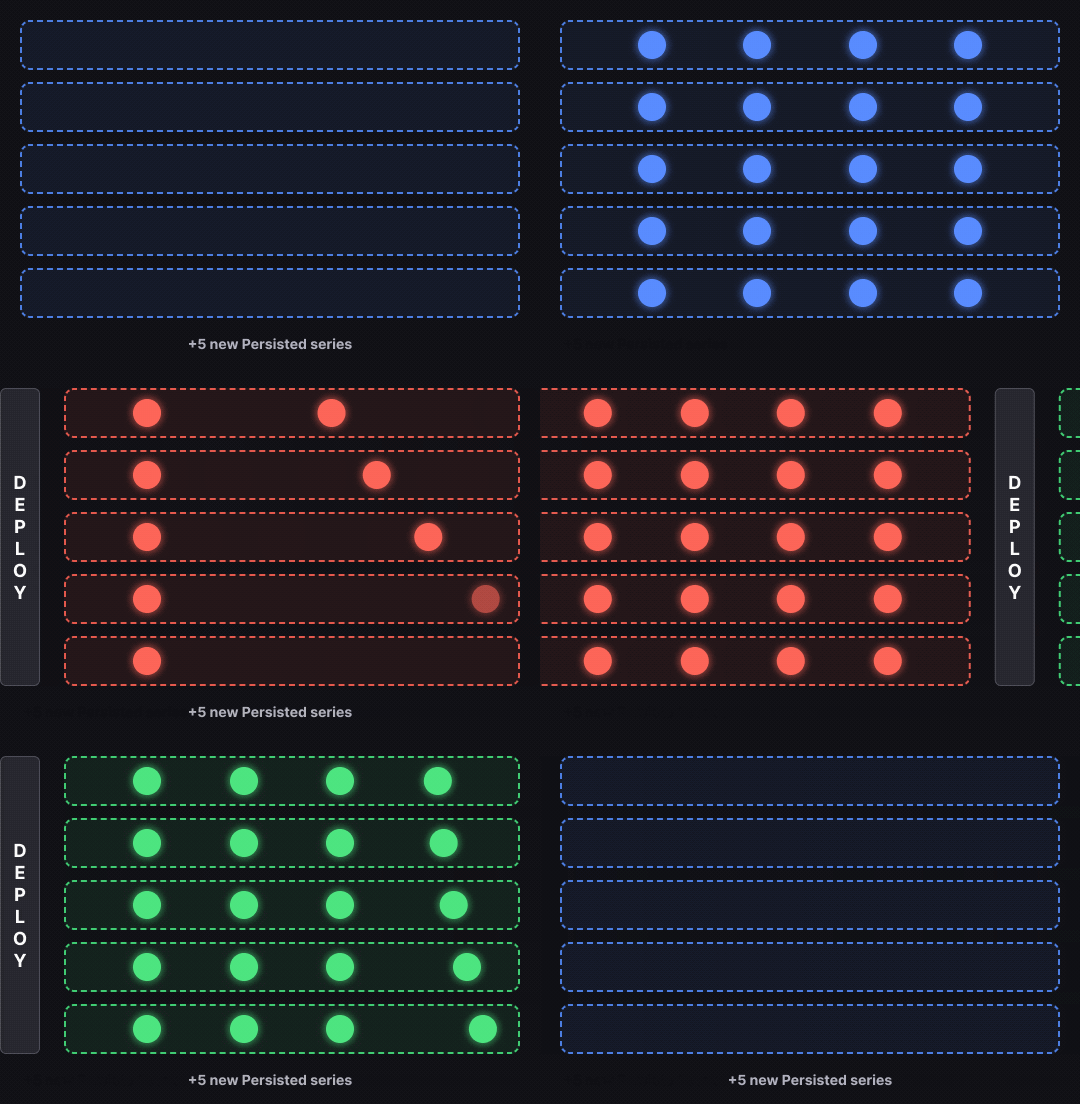
The following animated image shows five instances of a service deploying at a
four-minute interval. Each instance produces one unique series, for a total of five
persisted series.
Because each series is counted only once at first observation, the total persisted
series count is five, regardless of how many data points those series produce over
time.
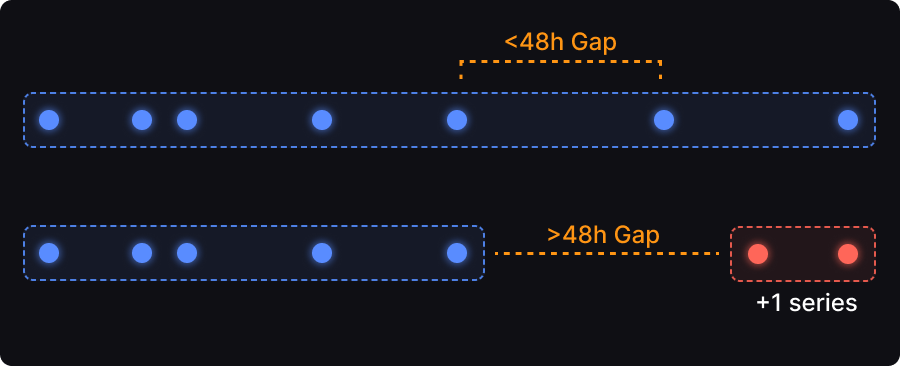
 Observability Platform uses a 48-hour window to determine whether a series is new. If
a time series continuously receives data points, or reappears within 48 hours of its
last write, it isn't counted again. Only if a series reappears after a gap of more
than 48 hours is it treated as new and incurs a new persisted series charge.
The following example shows an incoming series, followed by gap that exceeds the
48-hour window. Any series after that period is considered a new series, which incurs
a new persisted series charge.
Observability Platform uses a 48-hour window to determine whether a series is new. If
a time series continuously receives data points, or reappears within 48 hours of its
last write, it isn't counted again. Only if a series reappears after a gap of more
than 48 hours is it treated as new and incurs a new persisted series charge.
The following example shows an incoming series, followed by gap that exceeds the
48-hour window. Any series after that period is considered a new series, which incurs
a new persisted series charge.
 In practice, the vast majority of time series receive data points continuously for
their lifetime and are counted only once. The 48-hour window prevents double-counting
for series with brief gaps, rather than defining what's active at any moment.
#### How the consumption model differs from capacity
In the capacity model, the 2.5-hour window is inclusive: all series seen within the
window count toward the cardinality limit, regardless of whether they're still
actively emitting. Churn inflates the count because both old and new series overlap
in the window.
In the consumption model, the 48-hour window is exclusive: it prevents recently seen
series from being double-counted. A longer window reduces duplicate charges, and 48
hours is long enough that most series are never counted more than once.
This separation means cardinality in the consumption model reflects the actual
number of distinct series persisted, independent of timing effects.
### Combining persisted series and datapoints
In the consumption model, persisted datapoints and persisted series form the two
distinct halves of your total persistence cost, acting together to separate
cardinality from volume:
* Persisted series: captures how many unique time series exist. Counted once per
unique series at first observation.
* Persisted datapoints: captures how much data those series produce over time. Counted
for every data point written to storage.
The previous [animated image](#how-persisted-series-counting-works) contains five
instances. With an effective datapoint resolution (EDR) of 60 seconds, if each series
emits one data point per minute over a four-minute interval, the persisted data
points total 20:
```text theme={null}
five series * four data points per series = 20 persisted data points
```
The persisted series count remains five because each series is counted only once,
while the persisted data points count grows with each data point written.
### Metrics persisted histogram datapoint bucket
A metrics *persisted histogram datapoint bucket* is a bucket within a histogram
data point that Observability Platform persists to storage. One persisted histogram
datapoint bucket is incurred for each non-zero bucket within a persisted histogram
datapoint. Only populated bucket positions in the histogram's sparse encoding are
counted.
### Metrics matched datapoint
A metrics *matched datapoint* is a data point matched for aggregation. One matched
data point is incurred for each aggregation rule matched for each datapoint. If a
data point matches one rule, that's one matched datapoint. If a data point matches two
rules, that's two matched data points.
[Recording rules](/control/shaping/shape-metrics/rules/recording) don't count toward
matched data points.
### Metrics matched histogram datapoint bucket
A metrics *matched histogram datapoint bucket* is a bucket within a histogram
data point matched for aggregation. One matched histogram datapoint bucket is incurred
for each non-zero bucket within a matched histogram datapoint, multiplied by the
number of aggregation rules matched.
In practice, the vast majority of time series receive data points continuously for
their lifetime and are counted only once. The 48-hour window prevents double-counting
for series with brief gaps, rather than defining what's active at any moment.
#### How the consumption model differs from capacity
In the capacity model, the 2.5-hour window is inclusive: all series seen within the
window count toward the cardinality limit, regardless of whether they're still
actively emitting. Churn inflates the count because both old and new series overlap
in the window.
In the consumption model, the 48-hour window is exclusive: it prevents recently seen
series from being double-counted. A longer window reduces duplicate charges, and 48
hours is long enough that most series are never counted more than once.
This separation means cardinality in the consumption model reflects the actual
number of distinct series persisted, independent of timing effects.
### Combining persisted series and datapoints
In the consumption model, persisted datapoints and persisted series form the two
distinct halves of your total persistence cost, acting together to separate
cardinality from volume:
* Persisted series: captures how many unique time series exist. Counted once per
unique series at first observation.
* Persisted datapoints: captures how much data those series produce over time. Counted
for every data point written to storage.
The previous [animated image](#how-persisted-series-counting-works) contains five
instances. With an effective datapoint resolution (EDR) of 60 seconds, if each series
emits one data point per minute over a four-minute interval, the persisted data
points total 20:
```text theme={null}
five series * four data points per series = 20 persisted data points
```
The persisted series count remains five because each series is counted only once,
while the persisted data points count grows with each data point written.
### Metrics persisted histogram datapoint bucket
A metrics *persisted histogram datapoint bucket* is a bucket within a histogram
data point that Observability Platform persists to storage. One persisted histogram
datapoint bucket is incurred for each non-zero bucket within a persisted histogram
datapoint. Only populated bucket positions in the histogram's sparse encoding are
counted.
### Metrics matched datapoint
A metrics *matched datapoint* is a data point matched for aggregation. One matched
data point is incurred for each aggregation rule matched for each datapoint. If a
data point matches one rule, that's one matched datapoint. If a data point matches two
rules, that's two matched data points.
[Recording rules](/control/shaping/shape-metrics/rules/recording) don't count toward
matched data points.
### Metrics matched histogram datapoint bucket
A metrics *matched histogram datapoint bucket* is a bucket within a histogram
data point matched for aggregation. One matched histogram datapoint bucket is incurred
for each non-zero bucket within a matched histogram datapoint, multiplied by the
number of aggregation rules matched.